


Starbucks
4.8261.08K Reviews
App Specs
- Version
- 6.126
- Updated On
- License
- Free
- Downloads
- 10,000,000+
- Developer
- Starbucks Coffee Company
- Categories
- Food & Drink
- Platform
- Android, iOS
Screenshots


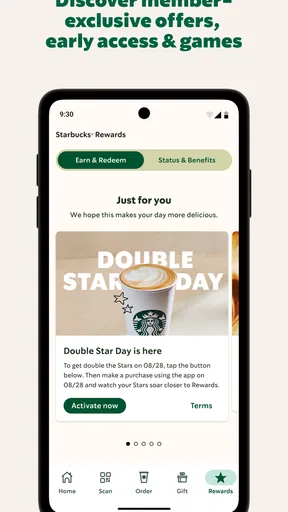
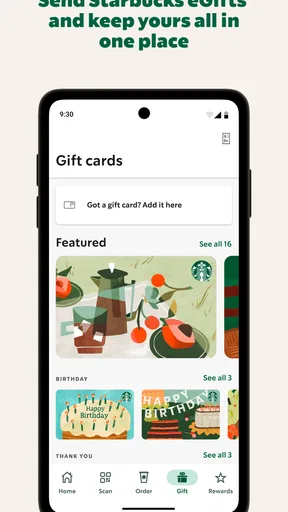
 Analysis by AppCompare
I tend to judge a coffee-ordering app by what happens when I’m in a hurry, not by how many extras it can squeeze onto a screen. Starbucks is most useful when I already know what I want, visit the chain often, and would rather handle payment and ordering on my phone than start from scratch at the counter. It is free, made by Starbucks Coffee Company, and focuses on ordering, paying, managing a Starbucks Card, and collecting rewards. That close link to one coffee chain is both its clearest strength and its main limitation: it can make a familiar routine easier, but it won’t help much if I usually buy coffee somewhere else.
Trust begins with a narrow purpose
For me, the sensible way to approach the app is to treat it as a tool for Starbucks purchases, rather than a general food-and-drink guide. It has a 4.8 average from around 1.5 million ratings, and has been downloaded over 10 million times. Those figures suggest broad use, but they don’t tell me whether its ordering flow suits my routine or answer questions about how my account and information are handled. I prefer to judge it by the choices I can see and the tasks I actually need it to do.
That distinction matters because ordering ahead and paying through an account involve more than picking a drink. I may be choosing a store, setting up a payment method, and deciding whether I want to keep using the app’s rewards features. I would take a moment to review the account and payment screens before relying on them, and only enter details I’m comfortable managing through the app. I don’t assume that a smooth checkout, on its own, tells me everything about data practices or security.
Visible choices are more useful than assumptions
The clearest user agency here is practical: I can decide whether to order in the app, use its payment tools, reload a Starbucks Card, or simply order in person instead. Those are different levels of commitment. Someone who wants to try mobile ordering can start with that task and see whether the process fits before making the app part of every visit. If I’m not interested in a Starbucks Card or rewards, I can still consider whether ordering on the phone is worthwhile for me without treating every feature as essential.
I also separate the app’s visible functions from claims I can’t verify by tapping around. A store finder or an order flow may involve location or account choices, but I wouldn’t infer exact permissions or privacy practices from the presence of those tools. My practical advice is to read the prompts when they appear, grant only the access that makes sense for the feature I’m using, and check the app’s settings and account options if I later change my mind. That’s a more grounded way to decide than assuming every request is necessary or, at the other extreme, that the app asks for nothing sensitive.
Ordering that earns its place in a routine
On a normal morning, I can see the appeal: I decide what I want before reaching the counter, choose a store, and use the app’s ordering and payment flow where it is available. That can make a rushed stop feel more predictable, especially when I’m repeating a familiar order. It is not a guarantee that every visit will be faster; the benefit depends on the store, timing, and whether the order flow matches what I need that day. I’d still check the selected location and order details before confirming rather than assume a previous visit’s choices are right.
The app is a Food & Drink app for everyone, and its current version is 6.112.1, with Android 10 as the minimum operating system. It first appeared on June 14, 2011. Those basics make it easy to understand who it is aimed at: people who want Starbucks-specific ordering and account tools on a compatible phone. I wouldn’t install it just because I want a general café finder or a way to compare independent coffee shops; its value is tied to choosing Starbucks.
Worth Reading Before You Choose

EA SPORTS FC Mobile 26 Is a Bigger Football Game, but It Takes Time

Flipboard Shows What News Apps Must Do Beyond the Feed

Switching to Android Auto Means Rethinking Your Driving Routine

Google Calendar Makes a Crowded Week Easier to Manage

Ludo King Makes the Most of the Minutes Between Plans

Baby Panda World Brings Quick Play to Modern Phones, but Its Game Library Feels Busy
When mobile ordering helps—and when it doesn’t
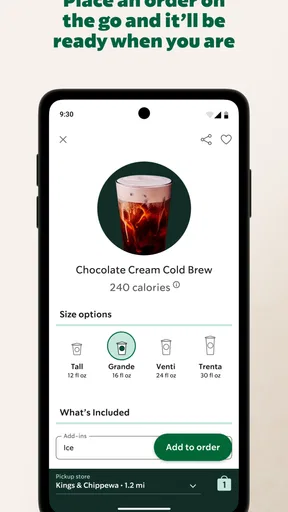
The strongest use case is a repeat order. If I tend to get the same drink, saved order history can reduce the number of choices I need to make each time. A useful habit is to review the size, milk, espresso shots, and selected store before sending it through. A past order is a shortcut, not a reason to skip checking: a small adjustment to a drink or a change in plans can make an old selection wrong. That quick check is especially worthwhile when I’m ordering for someone else or switching between hot and cold versions of a usual drink.
For a less routine visit, I’d use the customization controls more deliberately. Choosing ingredients and extras on screen can help me make a specific drink request without trying to remember every detail at the counter. But the same flexibility can slow me down if I’m unfamiliar with the menu or still deciding. In that situation, browsing first—or asking a barista a question in person—may be easier than building an order while watching a queue move. Mobile ordering is most helpful when it removes friction, not when it turns a simple coffee stop into a long series of taps.
Store selection deserves its own check. The app’s GPS feature can help locate a nearby Starbucks when I’m somewhere unfamiliar, but “nearby” is not automatically the right destination for my plan. I’d confirm the location attached to the order, particularly if I’m walking between neighborhoods, travelling, or choosing a store near work rather than home. That simple pause can prevent the common mistake of heading to the closest location on the map when I meant to pick up somewhere else.
Rewards and payment need a little attention
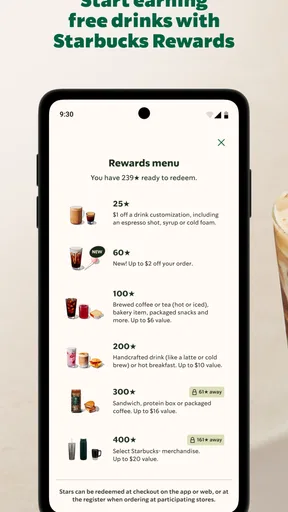
Rewards can be a pleasant extra for someone who already buys Starbucks regularly. Purchases can earn stars that may be redeemed for drinks or food, so the feature is more relevant to frequent customers than to someone who stops in only occasionally. I wouldn’t change where I buy coffee solely to chase points; the value depends on how naturally Starbucks fits into my spending. Before counting on a reward, I’d look at the app’s current terms and the options shown in my account, rather than assume every item or purchase works the same way.
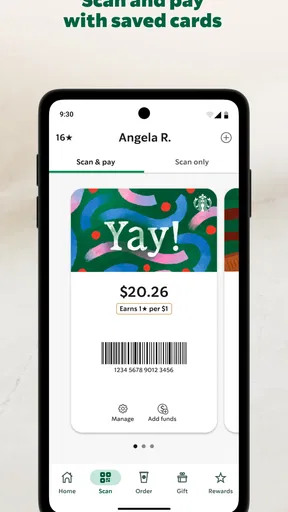
Reloading a Starbucks Card is useful if I like keeping café spending in one place, but it also means I should pay attention to the balance and reload choices I make. I’d avoid setting up a routine that adds money automatically unless I genuinely want that arrangement and understand how to manage it. If I only visit now and then, paying another way may be simpler than maintaining a card balance. This is one of the app’s meaningful trade-offs: combining payment and rewards can streamline a regular habit, while adding another account balance to keep track of can be needless work for an occasional customer.
When I’m paying through a phone, I also want a fallback. A low battery, a connection problem, or a moment when I can’t get to the right screen can turn a convenient routine into a delay. I’d keep another way to pay available rather than assume the app will always be ready at checkout. That is not a flaw unique to Starbucks; it is a practical limitation of making a phone the center of a purchase.
Useful details beyond the order button
The nutrition information can help me compare drink choices when ingredients or calorie totals matter to me. I treat it as a planning aid, not a substitute for checking the details of the particular customization I’m about to order. Once I change milk, add a syrup, or adjust a drink in several ways, I take another look at the displayed information rather than relying on what I remember from a standard version. That makes this feature more useful for an intentional choice than for a quick glance at a menu.
Order history has a similar strength and limitation. It can make a repeat purchase quicker, but it can also encourage me to order on autopilot. I find it more helpful to use a previous order as a starting point, then confirm the parts that can vary: store, size, temperature, and customizations. That workflow keeps the convenience without making yesterday’s preference an unexamined default. If I’m trying something new, starting fresh is often clearer than editing an old order with several changes.
The app has also included extras such as music playlists and games. I see those as secondary to ordering, payment, and rewards, not reasons to install it by themselves. App features can change over time, so I wouldn’t build my decision around an entertainment feature I may barely use. If all I want is a quick way to buy coffee, I can ignore the extras and focus on the parts that serve that purpose.
How it compares with ordinary alternatives
Compared with walking up and ordering at the counter, the app gives me more time to make selections and can help with a familiar order. In-person ordering is still better when I need advice, want to ask about a substitution, or am not sure what I want. A counter conversation also lets me resolve uncertainty before paying. I don’t see mobile ordering as a replacement for that interaction; I see it as an option for visits where my request is already clear.
Compared with a general café or food-ordering service, Starbucks’ own app is more focused on this one chain’s ordering, card, and rewards setup. That focus makes sense for regular customers who want those tools together. It is a poor fit for someone who wants to compare cafés across town, place orders with several businesses, or avoid maintaining another branded account. If flexibility across restaurants matters more than Starbucks-specific convenience, a broader service—or simply ordering directly wherever I go—may suit that person better.
There is also a trade-off between convenience and commitment. The app is free to download, but the real question is whether I will use it often enough to justify another account and another place to manage payment choices. For a daily or weekly Starbucks stop, the time saved on repeat orders may be worthwhile. For a rare visit, the ordinary counter experience can be simpler, with no setup or digital routine to maintain.
A practical way to decide whether it fits
I’d recommend trying the app if Starbucks is already part of your routine and you want to order ahead, repeat a customized drink, or keep track of a Starbucks Card and rewards in one place. On the first few visits, I’d check the store, customization, and payment details each time. Once the routine feels reliable, saved orders can do more of the work. I’d also take a moment to review the account choices and any permission prompts instead of tapping through them automatically.
I’d skip it if you rarely visit Starbucks, prefer paying face to face, or mainly need a tool for discovering and comparing local cafés. It may also be the wrong choice if you dislike linking purchases to a branded account or keeping a stored balance. Those preferences are reasonable, and the app’s convenience does not make them less so. The best app is the one that fits the way you already buy coffee, not the one with the most features.
If you’re a coffee lover like me, you probably can’t resist a good cup of joe. Enter the Starbucks app, a lifesaver for caffeine addicts. I’ve been using it extensively, and let me tell you, it’s a game-changer for anyone who frequents their local Starbucks.
Seamless Ordering Experience
First things first, the ordering process is a breeze. No more waiting in line forever. With just a few taps, you can customize your favorite drinks, from the type of milk to the number of espresso shots. The app remembers your past orders, so if you’re a creature of habit, reordering is super fast. Plus, the GPS feature helps you find the nearest store, which is a lifesaver when you’re in an unfamiliar area.
Loyalty Program Perks
One of the best things about the app is the rewards program. Every purchase gets you stars, and you can redeem them for free drinks or food. It’s like a little gift to yourself every once in a while. And, if you’re a Gold member, you get even more perks like free refills and birthday treats. Who doesn’t love a freebie?
Personalization and Extras
The app isn’t just about ordering coffee. It’s packed with features like personalized music playlists and in-app games that keep you entertained while waiting for your brew. Also, the app has a super handy nutritional info section, so you can keep track of what you’re consuming if that’s your thing.
User-Friendly Interface
The interface is smooth and intuitive. Even if you’re not tech-savvy, you’ll find it easy to navigate. Everything is laid out clearly, and the app is regularly updated to fix any bugs or issues. It’s clear that the developers put a lot of thought into making it user-friendly.
A cautious recommendation
Overall, I’d recommend the app to anyone who already enjoys visiting Starbucks and will make use of its ordering, payment, and rewards tools. It makes the whole coffee-buying experience faster, more efficient, and fun when the store and order details are right. Whether you’re a regular Starbucks goer or just an occasional visitor, it’s worth considering—but occasional visitors may find that ordering in person is just as easy. I’d try it for the features I actually need, keep an eye on account and payment choices, and see whether it genuinely improves my coffee routine.
Pros
- User-friendly interface for easy navigation.
- Customizable drink options enhance personalization.
- Rewards program offers valuable perks.
- Mobile ordering saves time during busy hours.
- Store locator helps find nearby locations easily.
Cons
- Limited payment options within the app.
- Occasional connectivity issues in crowded areas.
- Some features require frequent app updates.
- Push notifications can be overwhelming.
- Account setup requires personal information.
FAQs for Starbucks
What features does the Starbucks app offer?
The Starbucks app provides a range of features designed to enhance your coffee experience. You can order ahead to skip the line, customize your drinks, and earn rewards through the Starbucks Rewards program. Additionally, the app allows you to locate nearby stores, send gift cards, and enjoy exclusive offers.
How does the Starbucks Rewards program work within the app?
The Starbucks Rewards program lets you earn Stars for every purchase made through the app or with a registered Starbucks card. These Stars accumulate and can be redeemed for free drinks, food, and more. The app also provides special offers and bonus Stars opportunities to accelerate your rewards earning.
Is the Starbucks app secure for payments?
Yes, the Starbucks app is secure for making payments. It uses encryption to protect your personal and payment information. You can add funds to your Starbucks card within the app and use it to pay in-store or through mobile order. Additionally, the app supports multiple security features, such as password protection and touch/face ID.
Do I need an internet connection to use the Starbucks app?
While an internet connection is required to access most features of the Starbucks app, such as placing orders, checking your balance, or redeeming rewards, you can still use the app to pay in-store without a connection, provided you have pre-loaded funds on your Starbucks card in the app.
Can I customize my orders through the Starbucks app?
Absolutely! The Starbucks app allows for extensive customization of your orders. You can select your preferred size, choose from a variety of milk options, adjust the number of espresso shots, and add flavors or toppings. This feature ensures your drink is made exactly how you like it every time.


